Drafted with AI assistance
A language model produced the first draft from a human brief. A person then verified the claims, rewrote, and approved it.
- Editorially responsible
- Ahmed Chaabni
- Human review
- Model
claude-opus-4.8
Disclosed under Article 50, Regulation (EU) 2024/1689.
Governance policy · Machine-readable record
How We Made Gladtek.com Readable by AI Agents (and Why You Should Too)
AI agents are becoming a significant source of web traffic - and most websites are completely invisible to them. Here's how we made Gladtek.com AI-ready using llms.txt, a MiniSearch index, and an MCP server on Cloudflare Workers.
- 1The Web Is Growing a Second Audience
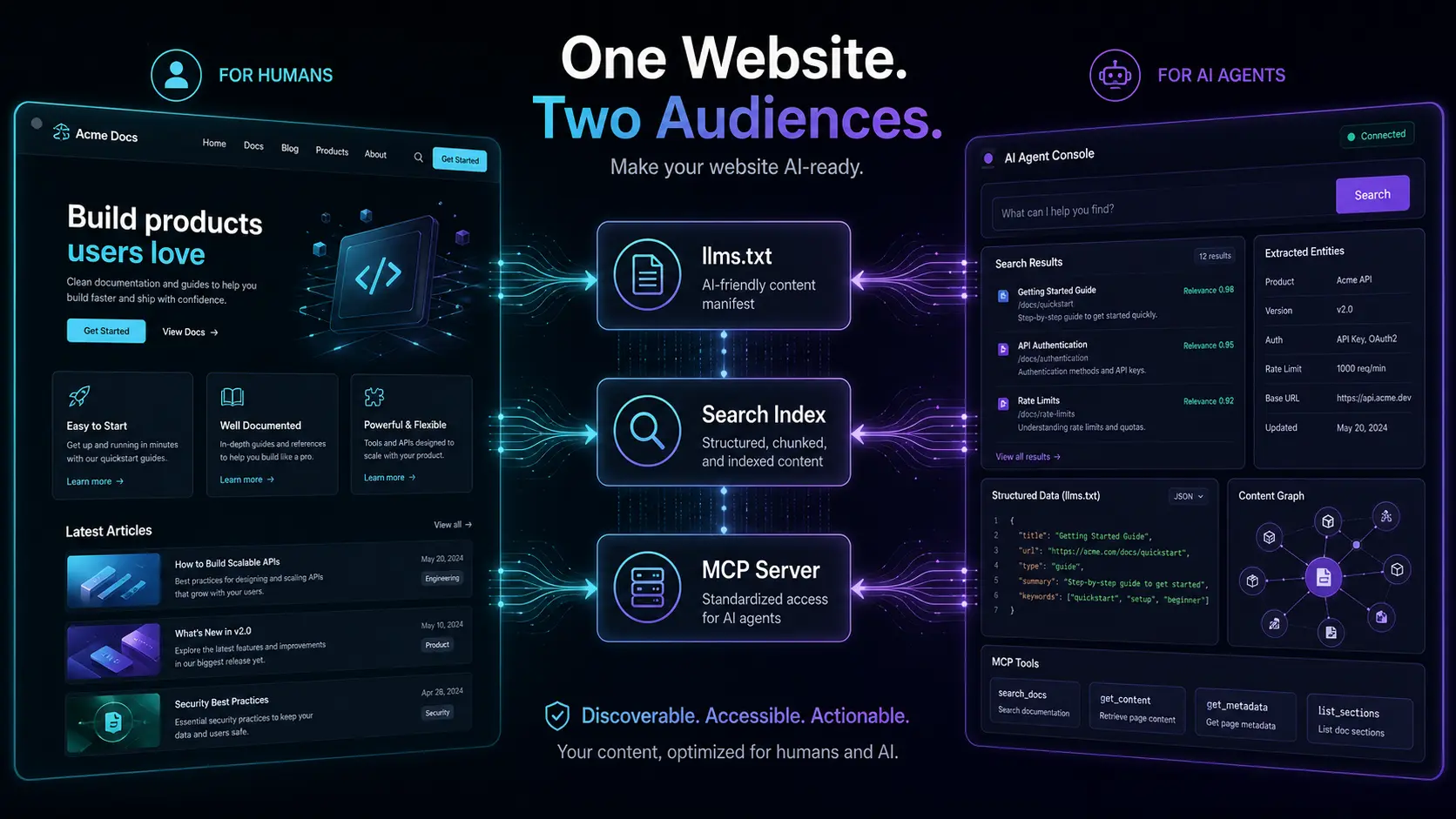
- 2What “AI-Ready” Actually Means
- 3Layer 1: llms.txt - Your Introduction to AI Agents
- 4Layer 2: Search Index - Letting Agents Find What They Need
- 5Layer 3: MCP Server - Your Site as a Structured API
- 6Layer 4: MCP Apps - Showing, Not Just Telling
- 7Bonus: RFC 8288 Link Headers for Agent Discovery
- 8The Result: AI Can Actually Work With Our Site
- 9How to Replicate This on Your Astro + Cloudflare Site
The Web Is Growing a Second Audience
When you build a website today, you’re building for two very different audiences.
The first is human: someone who lands on your page, reads your headline, and decides in a few seconds whether you’re worth their time. You know how to reach them - good design, clear copy, fast load times.
The second audience is new, and most websites ignore it entirely: AI agents. These are language models, autonomous research tools, and agentic workflows that browse the web on behalf of humans. They don’t care about your hero image or your hover animations. They need structured, machine-readable content they can actually parse and reason over.
When we rebuilt Gladtek.com on Astro and Cloudflare, we made a deliberate decision: build for both audiences from the start. This post explains exactly how we did it - and how you can too.
What “AI-Ready” Actually Means
Being AI-ready isn’t a single feature. It’s three layers working together:
| Layer | What it does | Why it matters |
|---|---|---|
llms.txt | A markdown sitemap for LLMs | Tells agents what your site contains and where to find it |
| Search index | A pre-built full-text index | Lets agents find relevant content without scraping every page |
| MCP server | A structured API for AI tools | Agents can call your site as a tool, not just read it as a document |
Think of it this way: llms.txt is your introduction, the search index is your table of contents, and the MCP server is your API.
This site’s MCP server is live at gladtek.com/mcp. The conversation that generated ideas for this post used it directly - the AI searched our blog, listed our services, and retrieved page content through structured tool calls.
Layer 1: llms.txt - Your Introduction to AI Agents
The llms.txt standard[1] is a simple convention: place a markdown file at the root of your site that describes what you offer and links to your key content. It’s the equivalent of robots.txt, but instead of telling crawlers what not to read, it tells AI agents what is worth reading.
Our llms.txt lives at /public/llms.txt and is deployed as a static file by Astro. It contains:
- A one-paragraph description of Gladtek and what we do
- Links to our core service pages
- A link to
llms-full.txt- a richer version that includes full blog post content - Our MCP server endpoint and available tools
# Gladtek
> Gladtek is an IT consultancy specializing in enterprise Java ecosystems...
## Core Services
- [Vaadin Development](https://www.gladtek.com/services/vaadin/)- [Astro Development](https://www.gladtek.com/services/astro/)...
## MCP Server (Agent Tool Access)
- [Gladtek MCP](https://www.gladtek.com/mcp) - tools: search_posts, get_post, list_services, get_page- Protocol: Model Context Protocol (MCP) HTTP Streamable transport- Auth: none required (public read-only)
No build pipeline needed - it’s a static file. Any agent that knows to look for llms.txt gets an immediate, structured overview of your site.
Layer 2: Search Index - Letting Agents Find What They Need
A static llms.txt tells agents what exists. A search index lets them find the right thing without reading everything.
We use MiniSearch[3] - a lightweight, dependency-free full-text search library - to build a pre-indexed JSON file at build time. The generation script (src/scripts/generate-search-index.ts) walks every .md and .mdx file in the posts directory, strips MDX components and markdown syntax, and outputs a clean JSON index.
export function generateSearchIndex(postsDir: string, siteUrl: string): SearchEntry[] {  const entries: SearchEntry[] = [];
  function walk(dir: string) {    for (const entry of fs.readdirSync(dir, { withFileTypes: true })) {      const fullPath = path.join(dir, entry.name);      if (entry.isDirectory()) {        walk(fullPath);      } else if (entry.name.endsWith('.md') || entry.name.endsWith('.mdx')) {        const raw = fs.readFileSync(fullPath, 'utf-8');        const { data, content } = matter(raw);        entries.push({          slug: slugFromCanonical(data.metadata?.canonical),          title: data.title,          excerpt: data.excerpt,          category: data.category,          tags: data.tags,          publishDate: new Date(data.publishDate).toISOString().split('T')[0],          body: bodyExcerpt(content, 500),        });      }    }  }
  walk(postsDir);  return entries;}
The MDX stripping step is important - it removes import statements, JSX components, and markdown formatting so the body text is clean prose that search algorithms can actually score correctly.
The resulting search-index.json is deployed as a static asset alongside the site and consumed by the MCP server at query time.
Layer 3: MCP Server - Your Site as a Structured API
The Model Context Protocol[2] (MCP) is an open standard that lets AI agents call external tools as part of their reasoning process. Instead of reading your site as a document, an agent can call search_posts("vaadin tailwind") and get back structured JSON - title, URL, excerpt, tags, and date.
We built our MCP server as a Cloudflare Worker (workers/mcp/), deployed at gladtek.com/mcp, on top of the official @modelcontextprotocol/sdk and Cloudflare’s agents package (McpAgent), which persists each MCP session in a Durable Object. It exposes four tools:
search_posts- full-text search over the blog with optional category and tag filteringget_post- fetch a full post by slug, returns cleaned body textlist_services- returns all Gladtek service offerings with descriptions and URLsget_page- fetch static pages (about, contact, integrations)
Requests use the MCP Streamable HTTP transport - each tools/call gets a real session (mcp-session-id), and the worker looks up the search index or static data before returning a structured result. A per-IP rate limiter (Cloudflare’s Workers Rate Limiting API) protects it from abuse.
export class GladtekMcp extends McpAgent<Env> {  server = new McpServer({ name: 'gladtek-mcp', version: '1.0.0' });
  async init() {    this.server.registerTool(      'search_posts',      {        description: 'Search Gladtek blog posts by keyword...',        inputSchema: {          query: z.string().optional(),          category: z.string().optional(),          limit: z.number().optional(),        },      },      async (args) => textResult(await handleToolCall('search_posts', args, await this.loadEntries()))    );    // ... get_post, list_services, get_page  }}
Deploying to Cloudflare Workers means the MCP server runs at the edge, globally, with zero cold starts on the free tier. It shares the same Cloudflare zone as the main site, so gladtek.com/mcp is just another route.
Layer 4: MCP Apps - Showing, Not Just Telling
Structured JSON is great for an agent’s reasoning, but it’s not always the best thing for a human to look at mid-conversation. MCP Apps[2] is an open extension to the MCP spec that lets a tool declare a ui:// HTML resource alongside its JSON result. Supporting clients (Claude web and desktop, VS Code Copilot, and others) render that HTML inline in a sandboxed iframe instead of a raw JSON blob.
We wired this up for our three most visual tools:
search_postsrenders as a grid of post cards - thumbnail, title, excerpt, categoryget_postrenders as a large detail card - thumbnail, title, tags, and a link to the full postlist_servicesrenders as a grid of service cards
Getting this working reliably across both Claude Desktop and the web took real debugging - our first attempt loaded the MCP Apps client runtime from a CDN, which rendered fine in Desktop but silently failed in the browser. The fix was to inline a small, dependency-free postMessage client directly into each view instead of loading one externally - removing the one variable that behaved differently across hosts.
Cards that link out (e.g. “Read full post”) also can’t just use target="_blank": the sandboxed iframe blocks that navigation outright. Instead, a click calls back into the host via the MCP Apps ui/open-link method, and the host - not the iframe - opens the tab.
The result: an agent doing research over the blog doesn’t just get text back, it can show the user an actual card while it works.
Bonus: RFC 8288 Link Headers for Agent Discovery
Beyond the four core layers, we added one more signal: RFC 8288 Link headers[4] on every response. These are HTTP headers that declare relationships between resources - in our case, pointing agents to llms.txt and the MCP server endpoint.
Link: <https://www.gladtek.com/llms.txt>; rel="describedby"; type="text/plain"Link: <https://www.gladtek.com/mcp>; rel="service"; type="application/json"Agents that know to inspect response headers get discovery hints without needing to know our URL structure in advance. It’s a low-cost, high-signal addition that any Cloudflare Worker can inject with a single response middleware.
The Result: AI Can Actually Work With Our Site
The practical outcome is that AI tools - from Claude to custom agentic workflows - can interact with Gladtek.com as a structured knowledge base rather than a wall of HTML. A research agent looking for Vaadin development expertise can:
- Discover the site via
llms.txt - Call
search_posts("vaadin tailwind")to find relevant posts - Call
get_post("vaadin-25-tailwind")to read the full content - Call
list_services()to understand what Gladtek offers
That’s a complete research workflow without a single page scrape - and with MCP Apps, the user watching the conversation sees post and service cards render inline the whole time, not just a wall of returned JSON.
How to Replicate This on Your Astro + Cloudflare Site
Here’s the checklist:
1. Add llms.txt to /public/ Write a markdown file describing your site, services, and key links. Include a pointer to your MCP server if you have one. Deploy as-is - Astro will serve it as a static file.
2. Build a search index at build time Use gray-matter to parse your content files and MiniSearch to build a JSON index. Run the script as part of your build via a postbuild npm hook or an Astro integration. Output to dist/ so it’s deployed with the site.
3. Deploy a Cloudflare Worker as your MCP server Implement the MCP HTTP Streamable transport - it’s a JSON-RPC endpoint. Expose tools that return structured data from your search index and any static content. Route it at /mcp on your domain via wrangler.toml.
4. Add RFC 8288 Link headers In your Cloudflare Worker, inject Link headers pointing to llms.txt and your MCP endpoint on every response.
5. Register with AI directories Submit your llms.txt URL to directories that aggregate AI-readable sites. The llms.txt community is growing fast - early listing compounds over time.
6. (Optional) Add MCP Apps to your most visual tools If a tool’s result is naturally visual - a list of items, an image, a card - register it with registerAppTool and pair it with a small inlined HTML view instead of returning plain JSON. Keep the client dependency-free (no CDN scripts) so it renders consistently across hosts, and use ui/open-link for any outbound links since sandboxed iframes block direct navigation.
The web’s second audience is here. Most websites aren’t ready for it. On Astro and Cloudflare, you can be - in an afternoon.

Claude
AI assistant by Anthropic, collaborating with the Gladtek team to produce technical content on enterprise CMS, Astro, and AI-ready web architecture.